Short version: to set up a Shopify store in South Africa, sign up for the free trial, set your store location to South Africa and currency to ZAR, load your products, choose a theme, connect a local payment gateway like PayFast or Yoco (because Shopify Payments doesn't work here), set up courier shipping, connect a .co.za domain, then switch off the password to go live.
You've got a product and customers asking where they can buy from you online. The obvious next move is your own store, but the moment you start reading about Shopify you hit a wall of American advice that assumes you can use Shopify Payments and ship with USPS. None of that applies here.
We build Shopify stores for South African businesses, so we know where the local potholes are. Shopify Payments doesn't work in SA, .co.za domains need a local registrar, and your shipping has to talk to couriers like The Courier Guy, not FedEx. Once you know that, the rest is genuinely manageable on your own.
This is the full walkthrough on how to use Shopify in South Africa, from signing up to going live, with every local detail filled in. If you're still deciding whether Shopify is right for you, read our guide first: How Does Shopify Work in South Africa?
The 8 steps, at a glance
- Create your Shopify account with an email and store name.
- Set your location to South Africa and currency to ZAR.
- Load your products.
- Choose and customise a theme.
- Connect a South African payment gateway.
- Set up shipping zones and couriers.
- Connect your .co.za domain and email.
- Switch off the password and launch.
Step 1: Sign up and pick a plan
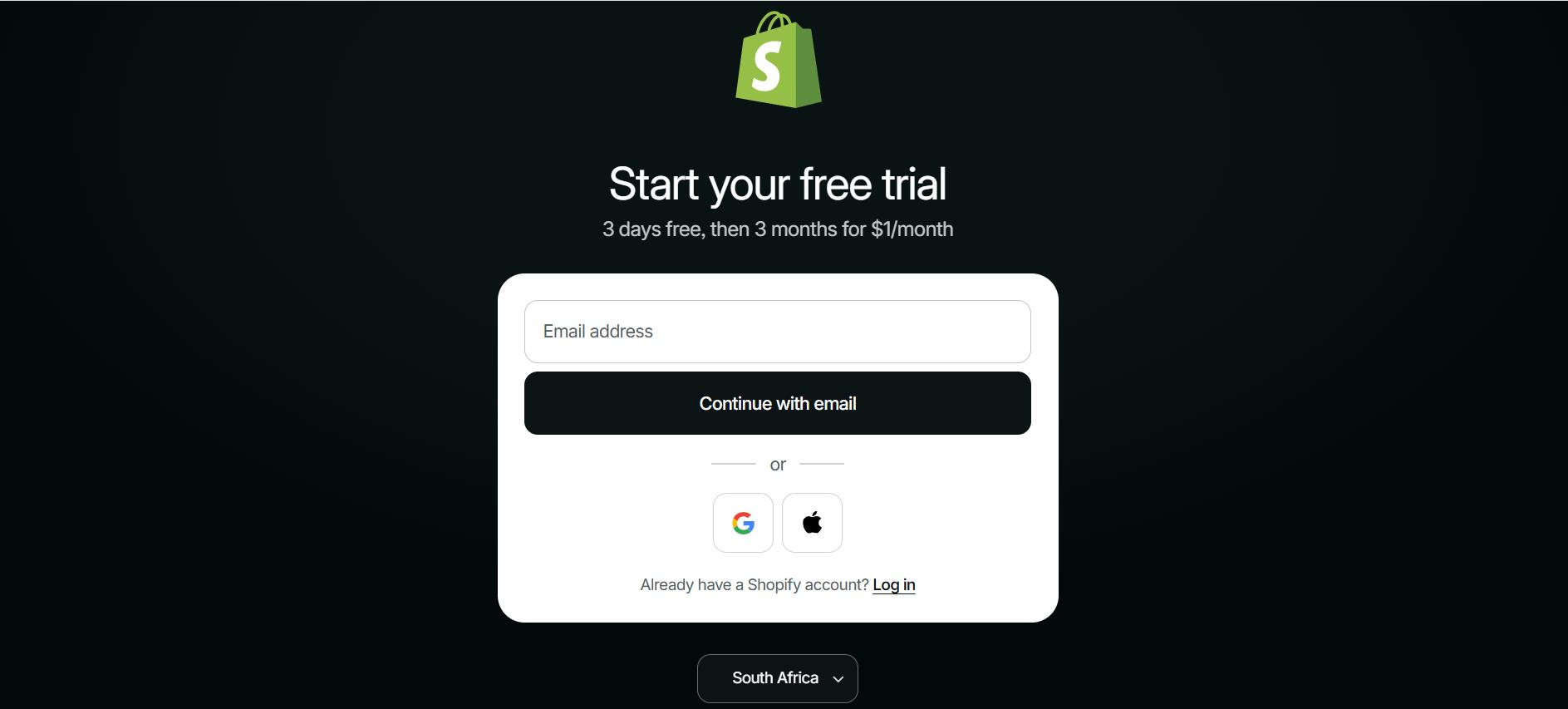
Shopify gives you a free trial so you can build and test before you pay anything. Signing up is as simple as entering an email and a store name. The current trial runs 3 days free, then just $1 a month for 3 months before standard pricing kicks in, so budget for that small step rather than expecting it to stay free indefinitely.
Get one thing right immediately: in your settings, set your store location to South Africa and your currency to South African Rand (ZAR), so your shop and checkout default to local money.
After the trial, you choose a plan. Most new SA stores start on the Basic Shopify plan, which runs roughly R410 to R420 a month at current exchange rates (or from around R310 a month if you pay annually). Shopify bills in US dollars, so the exact rand figure moves with the rate. Basic includes your online store, unlimited products, an AI store assistant and basic reports, which is plenty to launch with, and you can upgrade later for lower transaction fees.
If you want to plan your full monthly running cost before you commit, we break it down in what an ecommerce website really costs in South Africa.
Step 2: Add your products
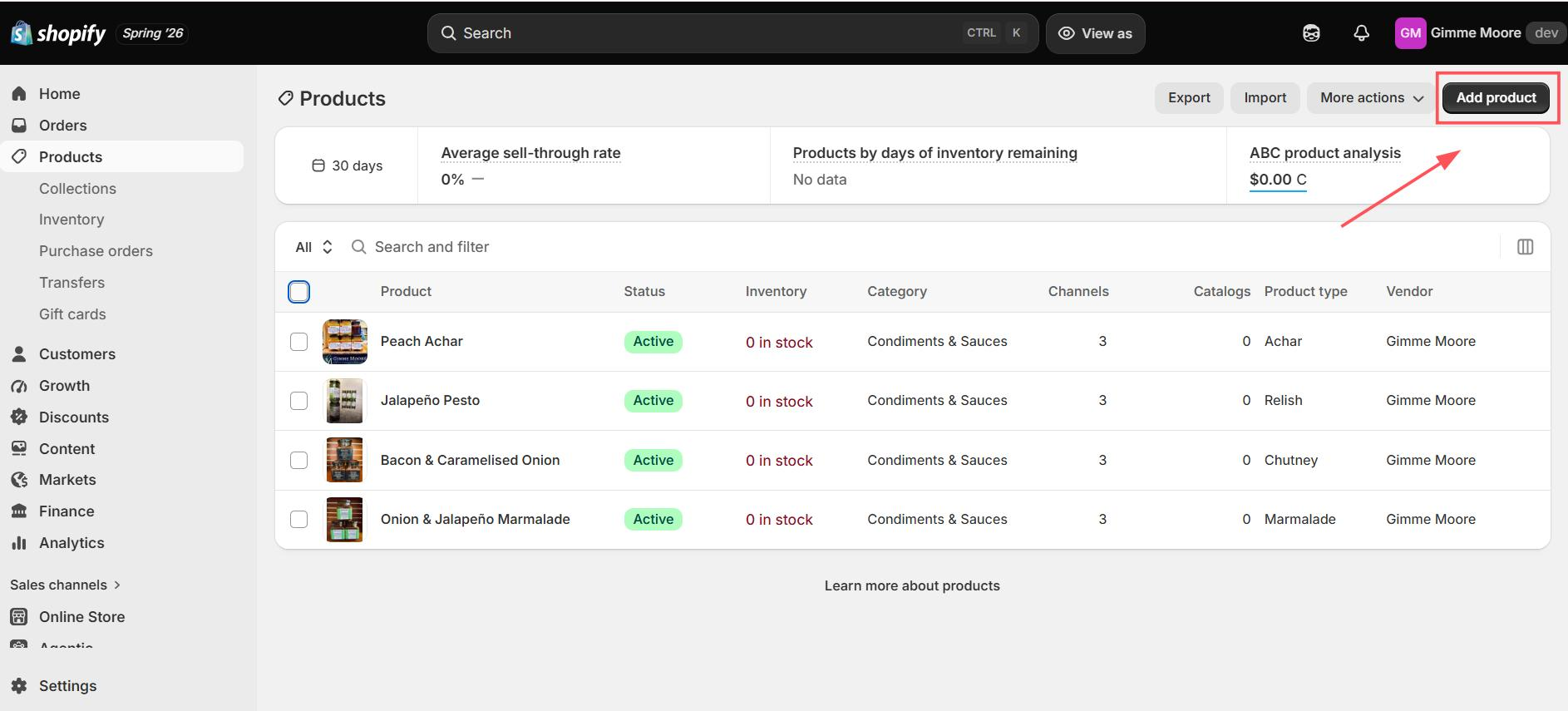
In the Shopify admin, go to Products, then Add product. Enter a clear title and description, and set the price in rand. Add multiple images, group products into collections, and set variants for sizes or colours where you need them.
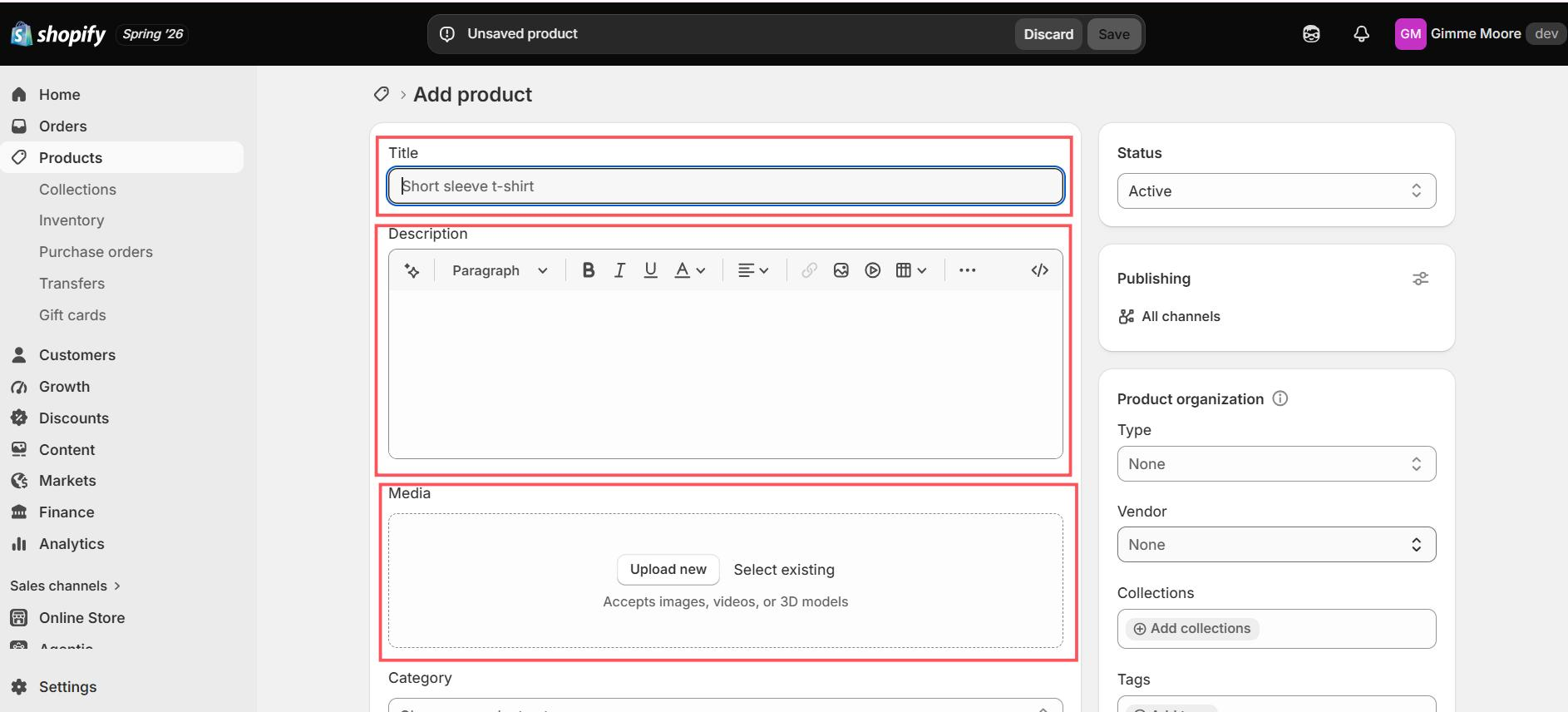
Spend real effort on your photos. Clear, consistent product images build trust and improve conversion, and poor images are a common reason shoppers leave without buying. Switch on inventory tracking for each product so you don't oversell, and enter a product weight if you plan to charge weight-based shipping later.
Step 3: Choose and customise a theme
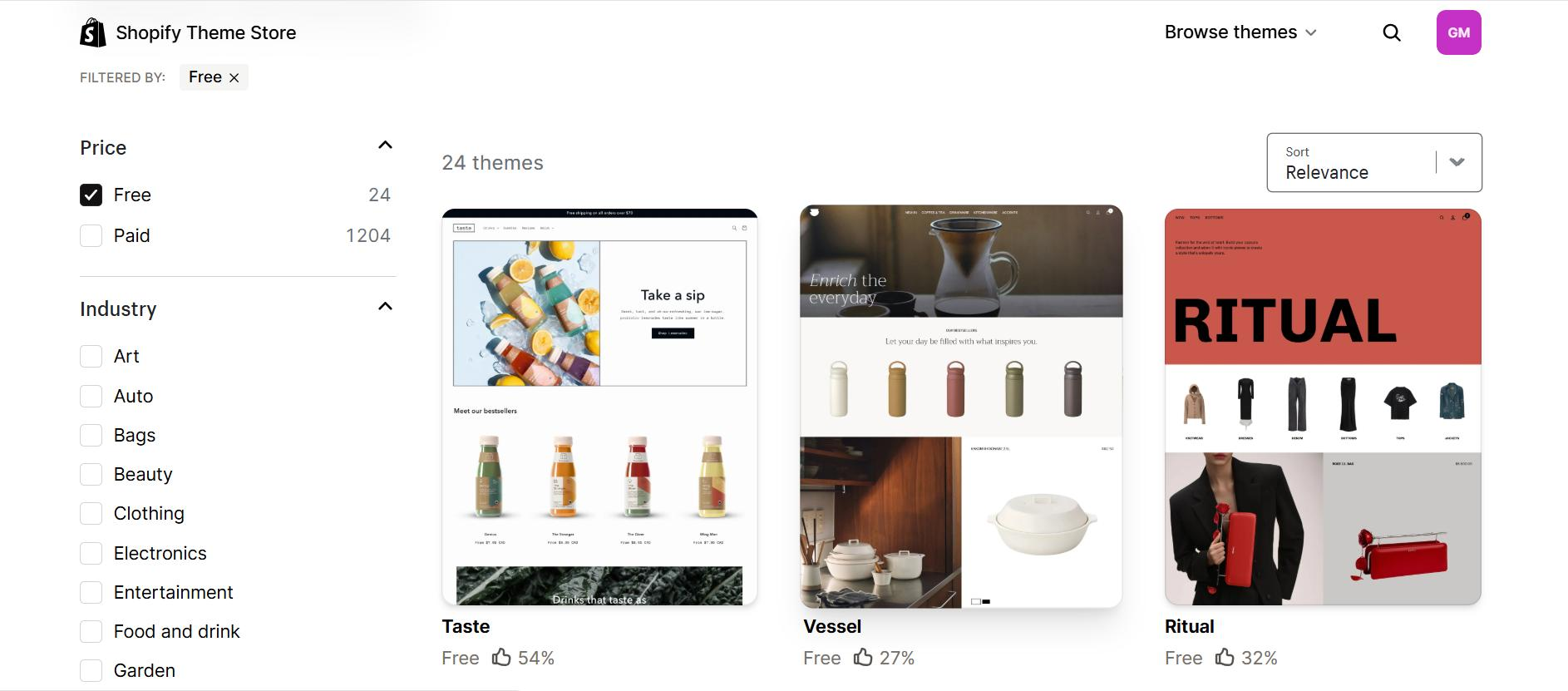
Your theme controls how the store looks. Shopify's Theme Store now has over 20 free themes, covering everything from fashion and art to skincare and home decor, plus paid options on top. Under the hood, almost all the free ones are presets built on two core templates: Dawn and Horizon. Which one you pick actually matters, so here's the honest trade-off:
- Dawn is the steadier choice: fast, simple, updated quarterly (so less risk of something shifting under you), and it scores well on mobile speed. Good if you want to launch quickly and keep things stable.
- Horizon is newer and far more flexible: more layout freedom, more built-in sections, and its own AI block generator for building custom sections without code. It updates weekly and, in independent speed tests, its mobile performance trails Dawn's. Good if design flexibility matters more to you than shaving milliseconds off mobile load time.
Since most South African shoppers are on their phones, that mobile-speed gap is worth weighing seriously before you pick. If you want the safer default, start with Dawn. If a more custom, flexible look matters more to you and you're happy to keep an eye on performance, Horizon is a genuinely strong option too.
Shopify also now offers an AI store builder: describe your business in plain language (what you sell, the mood you want) and it generates a custom storefront theme for you in seconds, which you can then refine by hand. It's a real shortcut if you'd rather not scroll through the theme library, though it's still worth reviewing what it builds rather than accepting the first result.
Paid themes exist too, typically running from about $150 to $400 (roughly R2,500 to R6,700). To install any theme, go to Online Store, then Themes, and browse the library, then use Shopify's built-in Theme Editor to change colours, fonts, layout and your logo without touching code.
Whichever route you take: most South Africans shop on their phones, so preview every page on mobile before you call it done.
Step 4: Set up payments (this is the SA part people miss)
This is the step where the American tutorials fall apart. Shopify Payments, Shopify's own built-in payment system, is not available in South Africa, so you have to use a third-party gateway instead. The good news is that Shopify integrates smoothly with local providers like PayFast, Peach Payments and Yoco.
How to choose and connect:
- Pick a provider: for most new stores PayFast is a strong default, supporting cards, Instant EFT, SnapScan, Zapper and more with no monthly fee. Yoco suits card-only stores with a slightly lower rate. Peach Payments suits larger businesses that need recurring billing or faster settlement.
- Connect it: this isn't a plain Shopify settings toggle, it's an app install that starts on your gateway's side. For PayFast, you start from the PayFast dashboard itself, not Shopify: log in, go to Settings, then Integrations, and click to integrate with Shopify.
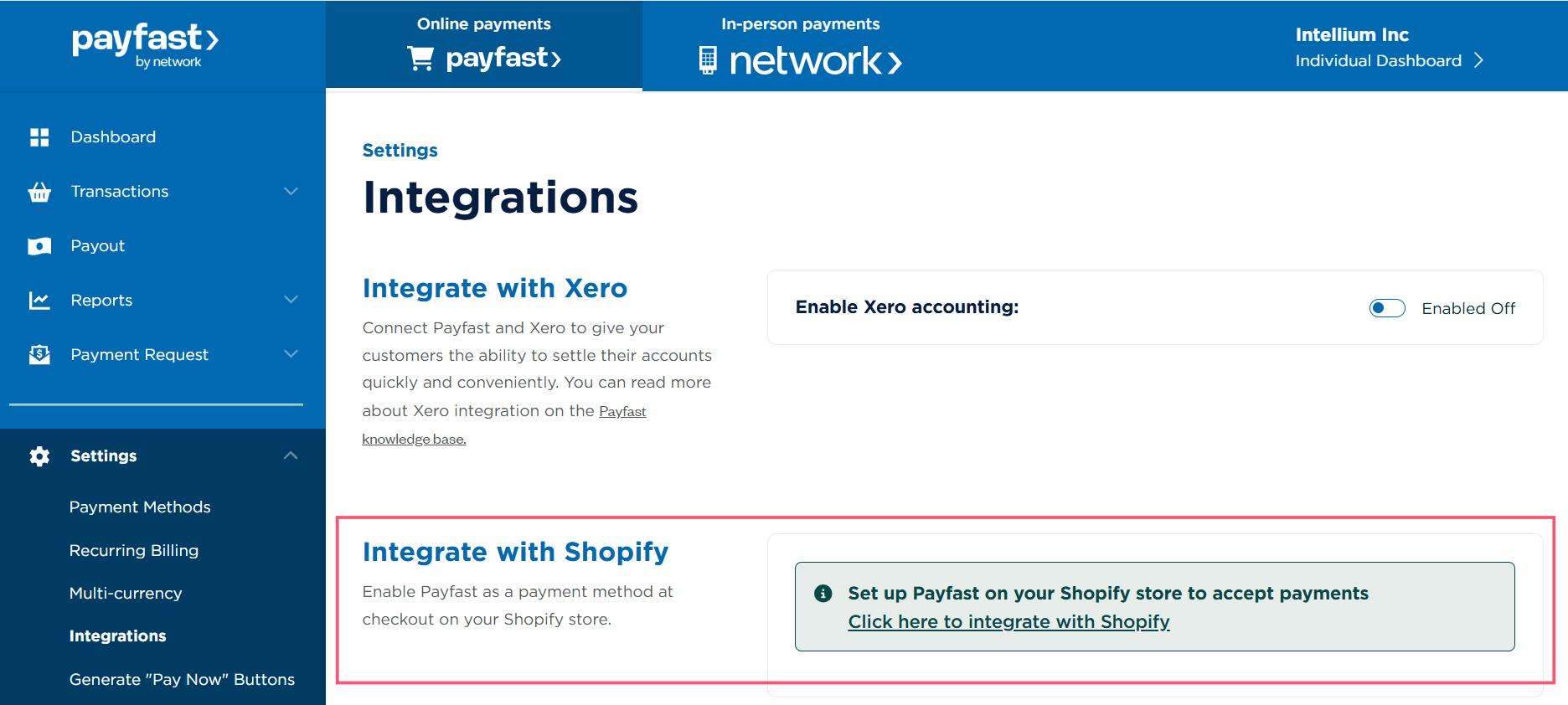
That installs the app from the Shopify App Store and authenticates your store.
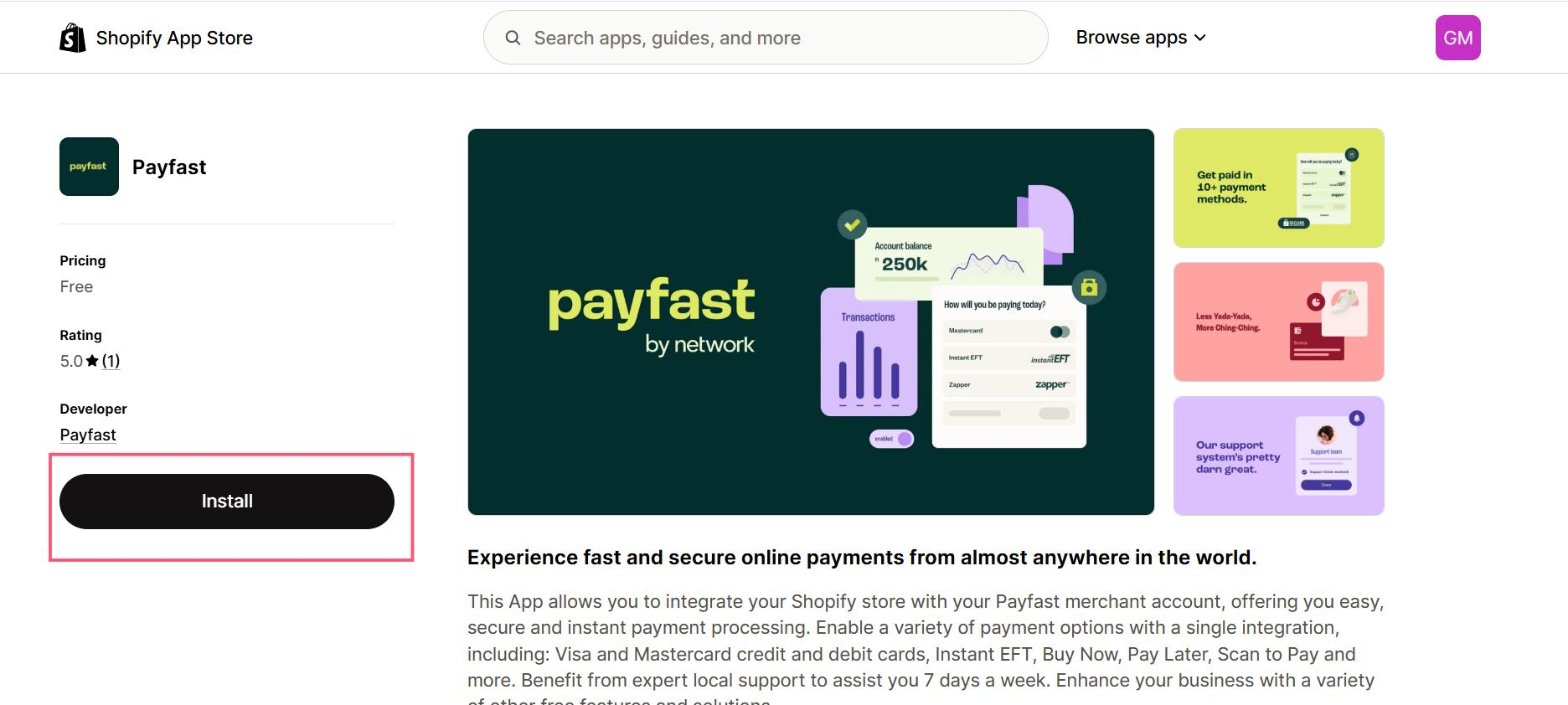
You then finish activation back in Shopify under Settings, then Payments, by adding PayFast as a payment method. Yoco and Peach Payments follow a similar app-based pattern. PayFast's own guide has the exact steps: PayFast on Shopify.
- Test it: run a low-value test transaction to confirm the checkout works and the order shows as paid in Shopify.
- Set your tax: VAT in South Africa is 15%. If you're VAT-registered, you can configure Shopify to add 15% VAT and issue VAT invoices.
Now the part to budget for. Each gateway has its own fee, shown below. On top of that, because Shopify Payments isn't available here, Shopify adds its own extra transaction fee on each sale — 2% on the Basic plan, 1% on Grow, 0.6% on Advanced. Add it up and expect roughly 4% to 6% of each sale to go to fees when you use an external gateway on the Basic plan.
| Gateway | Typical fee | Best for |
|---|---|---|
| PayFast | Roughly 3.2–3.5% + R2 per transaction, no monthly fee | Most new stores, widest range of SA payment methods |
| Yoco | Roughly 2.5–2.95% ex VAT, tiered by plan and volume | Card payments, simplicity, selling in person too |
| Peach Payments | Roughly 2.95% + R1.50, plus a monthly account fee on some plans | Growing stores, recurring billing, fast settlement |
Pick one to start with, get it working, and add or switch later if you need to.
Step 5: Configure shipping and couriers
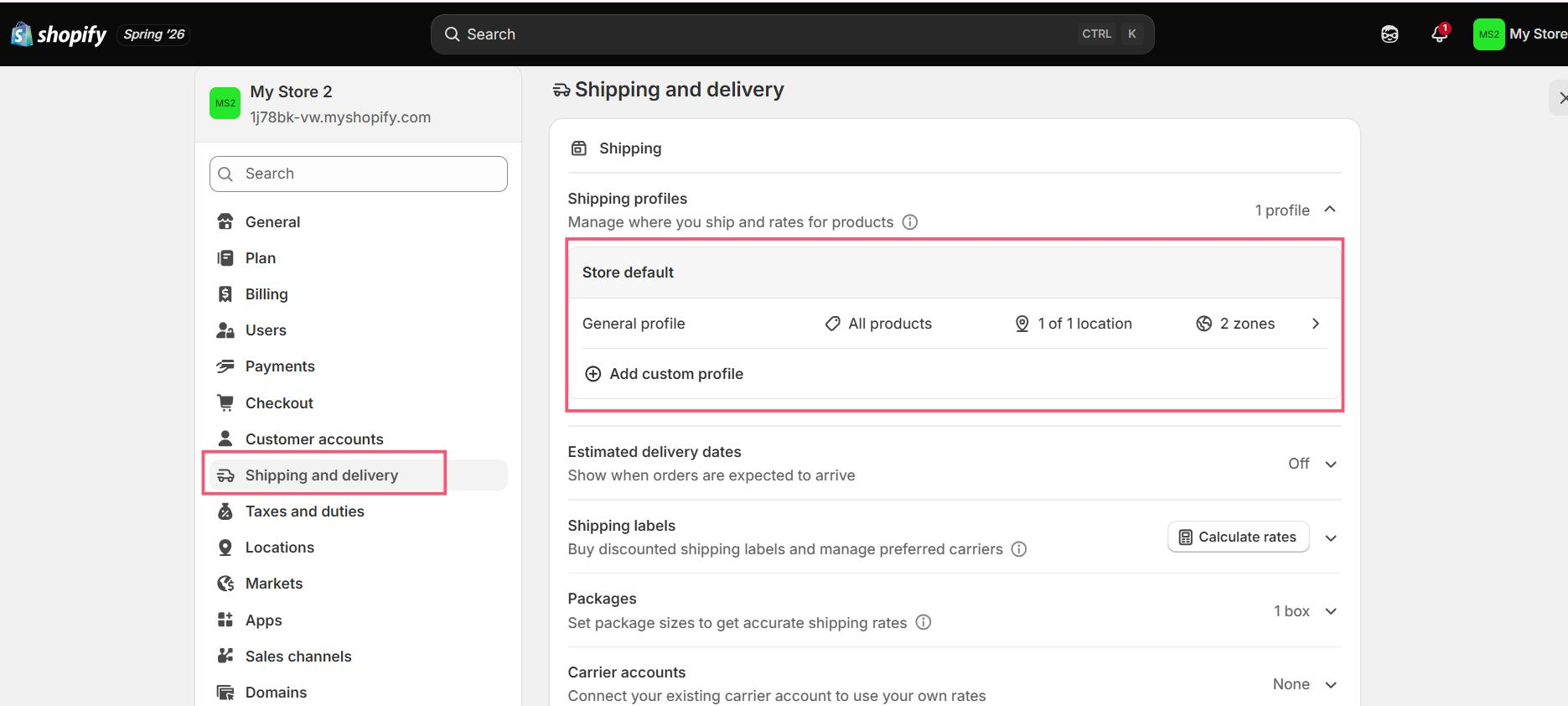
Go to Settings, then Shipping and delivery, and create a shipping zone for South Africa. You can set flat rates, weight-based rates, or price-based rates. Many new owners start with a simple flat rate, or offer free shipping above a threshold to push up order values, since high shipping costs are a common cause of abandoned carts.
Shopify doesn't run its own courier service in SA, but it connects to local couriers, each in its own way, so it's worth knowing the pattern before you pick one:
- The Courier Guy: has its own Shopify app. You'll need an existing Courier Guy account to use it, and once connected it shows live rates at checkout and lets you print waybills straight from your Orders page.
- Fastway (Aramex): also has its own direct Shopify app, listed on the Shopify App Store under Fastway Couriers South Africa.
- Dawn Wing: works a little differently. You sign up with their partner platform, eSolutions, first to get a Dawn Wing account number, then install their free Shopify app to connect it.
- Bob Go: if you'd rather compare several couriers through one connection instead of installing separate apps, Bob Go is a shipping aggregator that plugs into around a dozen SA couriers (including The Courier Guy, Fastway and Aramex) and routes each order to whichever is cheapest. It runs from roughly R299 to R699 a month plus a few rand per shipment.
Whichever you choose, once it's connected you can show live rates at checkout and print labels straight from your admin. Keep it simple at launch: one delivery method, such as door-to-door courier nationwide, and a clear rate.
Step 6: Connect a .co.za domain and email
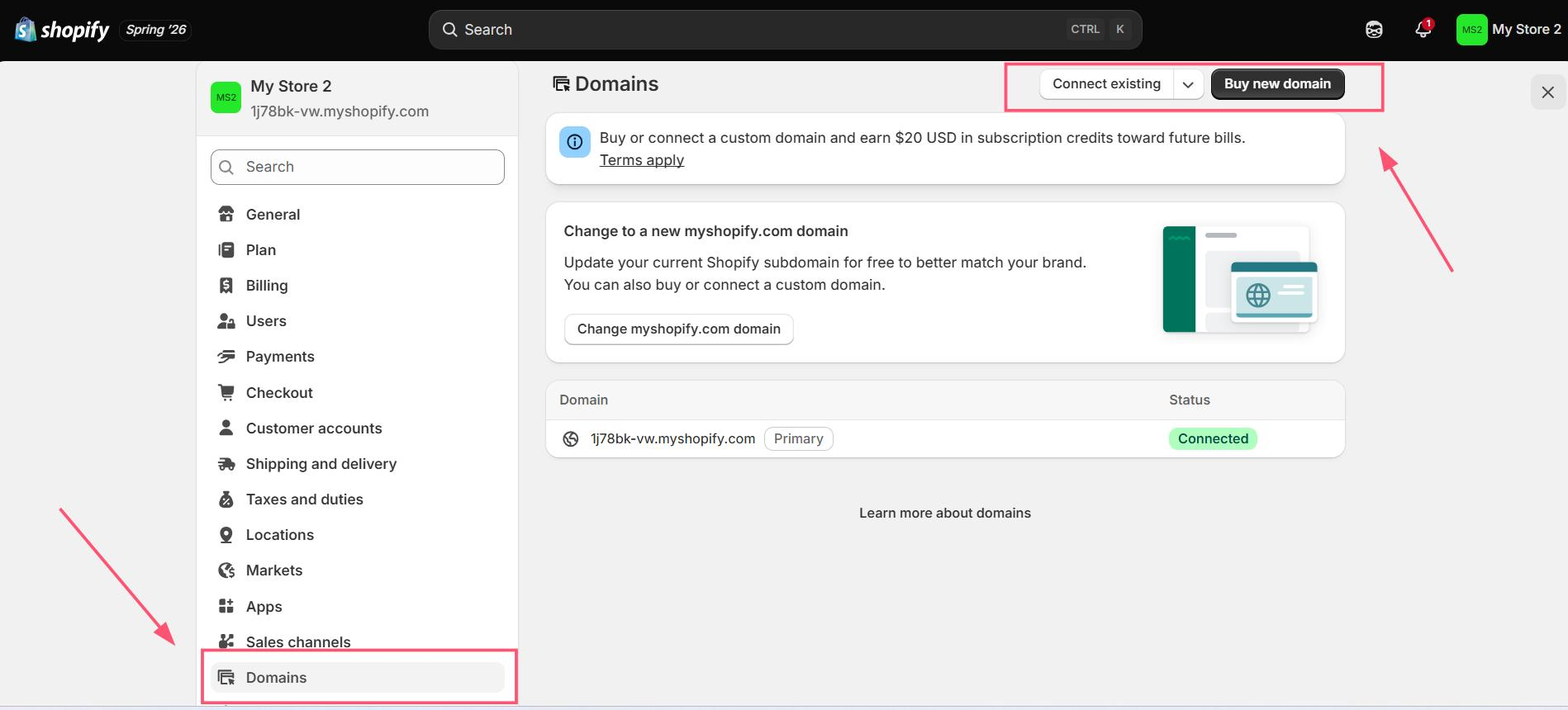
A custom .co.za domain builds trust with local shoppers and helps your visibility in Google's South African results compared to the default yourstore.myshopify.com address.
- Buy from a local registrar: Shopify's own domain purchase doesn't support .co.za directly, so it's common to buy from a South African registrar such as Domains.co.za or xneelo. A .co.za domain typically costs around R90 to R105 a year.
- Connect it in Shopify: go to Settings, then Domains, click Connect existing domain, and enter your .co.za address. Shopify gives you the DNS records to add at your registrar, usually an A record pointing to Shopify's IP and a CNAME for www pointing to shops.myshopify.com. Changes can take a few hours to propagate.
- Set it as primary: once verified, set the .co.za domain as your primary domain so all traffic uses it.
- Sort your email: Shopify doesn't host email for your domain, so you use a third-party host. Many small businesses use Zoho Mail or Google Workspace, and some registrars also offer basic forwarding, so [email protected] can land in your personal Gmail. Either way, you add the MX or TXT records through your DNS settings.
Step 7: Launch your store
By default, new Shopify stores are password-protected, and visitors see a password page until you switch that off. One catch worth knowing upfront: even if you're still inside your trial, Shopify won't let you remove the password until you've chosen a subscription plan, so pick your plan first.
- Remove the password: go to Online Store, then Preferences, clear the password under Password Protection, toggle it off and save. Your site is now public. (You can also do this from Online Store > Themes, where a banner offers a direct "Remove password" button.)
- Run final checks: place a test order through the full flow, check your order emails and receipts, confirm inventory adjusts, and preview on a few devices.
- Go live: confirm yourstore.co.za loads your site and that SSL is active (Shopify provides an SSL certificate automatically for connected domains), then announce it.
A basic Shopify store can be ready in about one to three days if your content is prepared, while a more polished, fully optimised store usually takes one to two weeks. People searching for how to create a Shopify store in South Africa often expect a weekend job, and that's realistic, but the timeline still depends on how many products you have, how much custom design you want, and how much testing you do.
If budget is what's driving the build-it-yourself versus hire-someone decision, this helps frame it: How Much Does a 5-Page Website Cost in SA?
Want your Shopify store built for you?
We set up Shopify stores for South African businesses, payments, domain and all, from R5,999.
Quick answers
Can I use Shopify Payments in South Africa?
No. Shopify Payments isn't available to South African merchants, so you connect a local gateway like PayFast, Peach Payments or Yoco instead. Because of that, Shopify also adds its own extra transaction fee on each sale, from 2% on the Basic plan down to 0.6% on Advanced.
How much does it cost to set up a Shopify store in SA?
The Basic Shopify plan runs roughly R410 to R420 a month at current exchange rates (from around R310 if you pay annually), billed in US dollars, so the rand figure moves. On top of that, budget for payment gateway fees of around 4% to 6% per sale combined on the Basic plan, an optional paid theme (about R2,500 to R6,700 once-off), and a .co.za domain at around R90 to R105 a year.
Do I need a .co.za domain, or can I just use the Shopify address?
You can launch on the free yourstore.myshopify.com address, but a .co.za domain is worth it. A local custom domain builds trust with South African shoppers and improves your visibility in Google's South African search results.
How long does it take to set up a Shopify store?
A basic store can be live in about one to three days if your products and content are ready, while a more polished store usually takes one to two weeks. A first-timer following the steps above can comfortably set up a Shopify store solo over a weekend, then spend a few more days polishing.
Rather have it done properly the first time?
Conversion-ready Shopify stores for South African businesses, from R5,999.